
The fastest way to make AI photos of yourself that do not look AI is to stop describing your face in the prompt and train a likeness model on 15 to 20 real photos instead. Then spend your prompt budget on the three things text is actually good at: the scene, the light, and the camera. Almost every fake-looking AI portrait fails because the prompt tried to do the model job.
Summary
- A trained likeness model holds your face constant. A text description of your face does not, and drifts every generation.
- Prompts should carry scene, wardrobe, lighting, camera body and lens, colour grading, and negatives. Not facial features.
- The negatives do most of the realism work. No beauty filter, no skin smoothing, visible pores, slight asymmetry.
- Naming a real camera and lens is the single highest-return line you can add.
- Lock hair and facial hair in every prompt even with a trained model. They drift the most.
- Do not generate real public figures. Use your own likeness, or people who have agreed in writing.
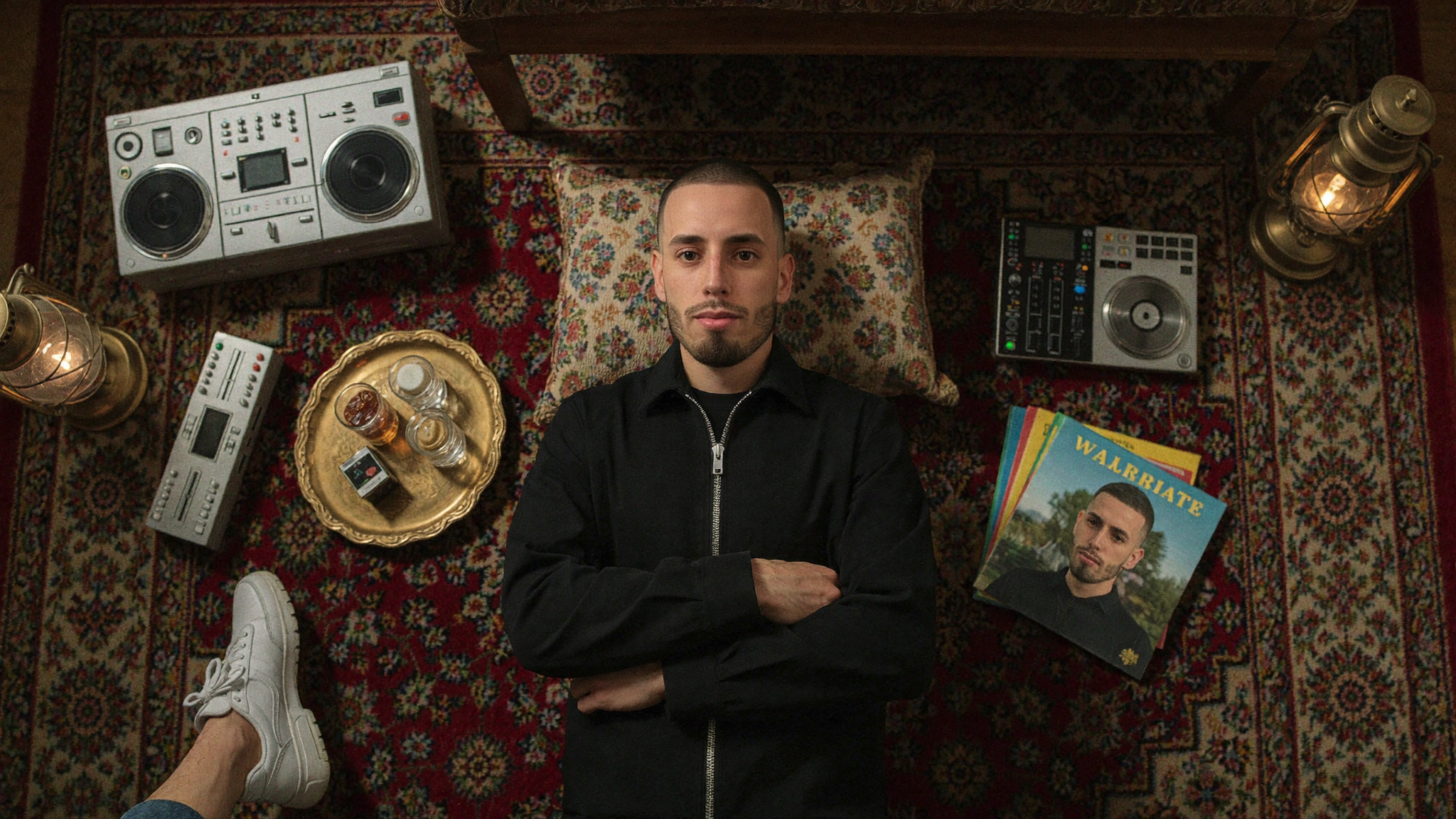
Table of Contents
- Why do most AI photos of people look fake?
- Trained model vs describing yourself in the prompt
- The six-block prompt structure
- Three prompt recipes you can copy
- The negatives that do the heavy lifting
- Where this goes wrong: likeness and consent
- What it costs and how long it takes
- Common mistakes
- Frequently asked questions
Why Do Most AI Photos of People Look Fake?
Because the default behaviour of every image model is to make the subject more attractive, more symmetrical and more evenly lit than any real camera would. Left unchecked, that produces a face that reads as an illustration of a person rather than a photograph of one. There are five reliable tells.
- Plastic skin. No pores, no oil, no texture variation across the forehead and nose. This is the biggest single giveaway and it is entirely fixable with negatives.
- Too much symmetry. Real faces are not symmetrical. Real eyes are not the same size. Models average toward symmetry unless told not to.
- Impossible lighting. Highlights with no source, shadows that do not fall in a consistent direction, or an overall glow that no room produces.
- Helmet hair. Hair rendered as a single mass rather than individual strands with flyaways. Fades and short cuts are especially prone to this, and models frequently invent a shaved line design that nobody asked for.
- Fabric that has never been worn. Perfectly smooth t-shirts with no stretch across the shoulders and no creases at the elbow.
Fix those five and most people stop asking whether the image is real. They start asking who shot it.
Trained Model vs Describing Yourself in the Prompt
Train a model. A written description of a face is a compression of maybe 30 words, and the model fills the remaining detail differently every single generation. That is fine for a stock-photo stranger and useless for a personal brand, where the whole point is that the same person appears in every image.
| Prompt description only | Trained likeness model | |
|---|---|---|
| Consistency across images | Poor, drifts every generation | Strong |
| Setup effort | None | 15 to 20 photos, roughly ten minutes of training |
| Prompt length needed | Long, half of it wasted on the face | Shorter, all of it spent on the scene |
| Works for a stranger or model | Yes | Not needed |
| Works for your own brand | No | Yes |
What to feed the training set
- 15 to 20 photos, varied. Different days, different light, different angles.
- A mix of distances: a few tight on the face, a few from the chest up, a few full body.
- Neutral expressions plus a couple of natural ones. Avoid a set where you are grinning in every frame.
- No sunglasses, no heavy filters, no group shots where the crop cuts your face in half.
- Current appearance only. A training set spanning three different haircuts produces a model that cannot decide.
We wrote up the whole process, including where it fell short, in I trained an AI clone of myself. The broader shift this creates for content and UGC is covered in AI clones are changing social media forever.
The Six-Block Prompt Structure
Every prompt that produces editorial-grade output has the same six blocks in the same order. Write them as one paragraph, comma separated, no line breaks.
| Block | What it controls | Example |
|---|---|---|
| 1. Scene | Subject, action, location, props | A man working on a laptop on the deck of a mountain cabin, coffee mug beside him |
| 2. Wardrobe and grooming | Clothing, hair, facial hair | Black hoodie, short buzz cut with high skin fade, well-groomed short dark beard |
| 3. Lighting | Source, direction, quality | Soft overcast morning light with mist |
| 4. Camera | Body, lens, depth of field | Shot on ARRI Alexa 35, 35mm lens, realistic shallow depth of field |
| 5. Texture and grade | Skin, fabric, film stock, grain | Visible pores, realistic fabric wrinkles, Kodak Vision3 colour, fine film grain |
| 6. Negatives | What to suppress | No beauty filter, no skin smoothing, no CGI look, no readable text on screen |
Block four is the highest-return single line in the whole prompt. Naming a real cinema body and a real focal length pulls the output toward the visual characteristics of actual footage: the depth of field behaves, the highlight rolloff softens, and the plastic look starts to fall away before you have touched a negative.
Three Prompt Recipes You Can Copy
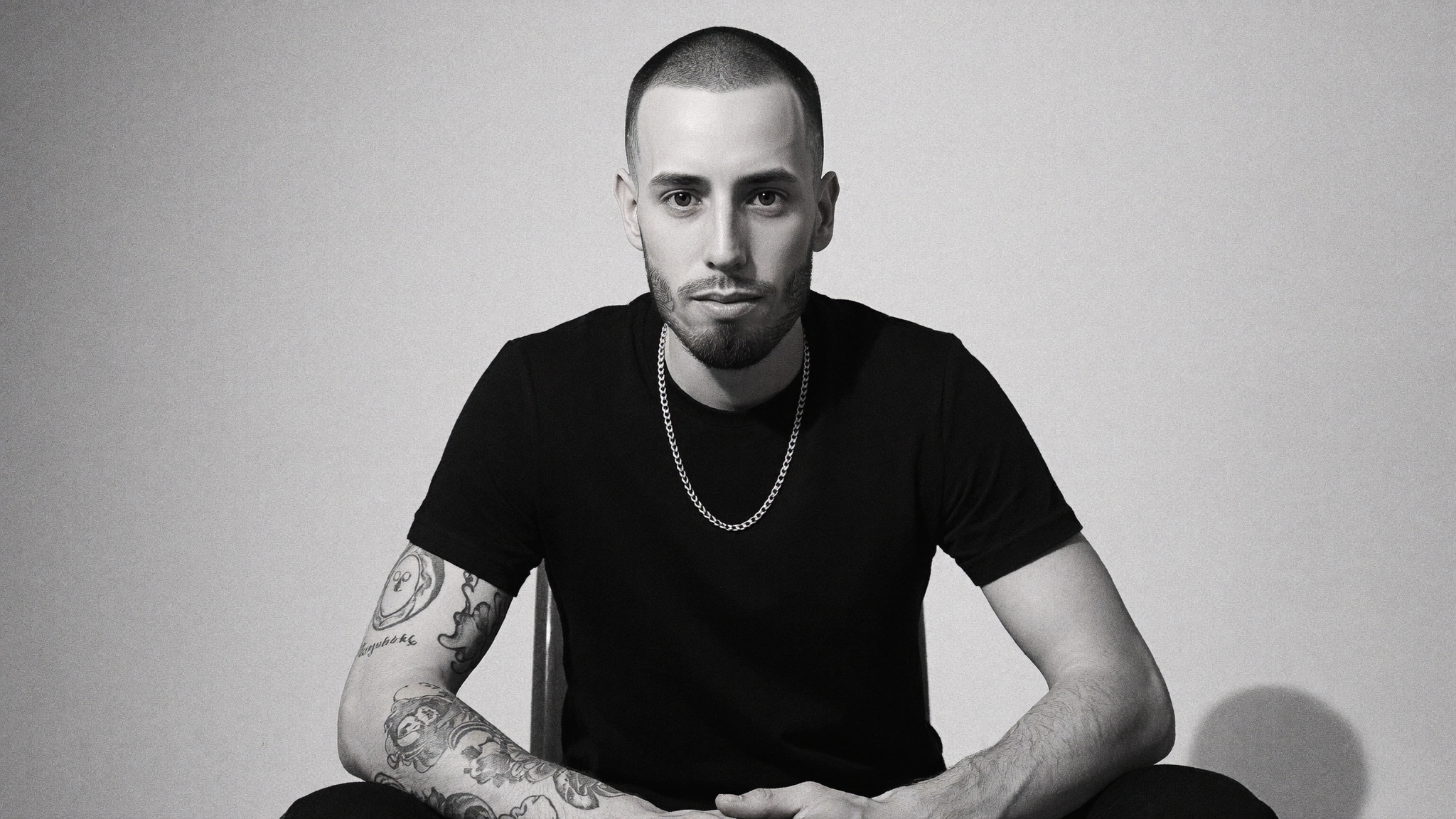
These are the actual prompts, not summaries of them. The first two produced the two images in this article. Swap the scene and wardrobe, keep everything from the camera block onwards.
Recipe 1: overhead flat-lay, heritage meets luxury
This is the composition doing the rounds right now: shot straight down, subject lying on a patterned rug, surrounded by objects that tell a story about them. It works because the objects carry the narrative, so the face does not have to.
Overhead flat-lay editorial photograph looking straight down. A man lying on his back on a deep red and cream Persian rug, arms folded across his chest, looking up at the camera. Wearing an all-black zip jacket, black trousers and white chunky sneakers. Short buzz cut with high skin fade and well-groomed short dark beard. Arranged around him on the rug: a vintage silver boombox, a DJ controller, a small mixer, stacked vinyl records and sleeves, a brass tea tray with small glass cups and dates, a lit brass lantern, embroidered cushions. Warm practical lamp light, deep shadows. Shot on ARRI Alexa 35, 35mm lens, realistic shallow depth of field. Natural skin texture with visible pores, peach fuzz, slight asymmetry and tiny imperfections, no beauty filter, no skin smoothing, no airbrushing. Irregular facial hair growth, individual hair strands with flyaways. Realistic fabric wrinkles and natural folds. Accurate shadows, natural lighting falloff. Kodak Vision3 color, natural contrast, soft highlight rolloff, fine film grain. Candid unposed documentary framing. No readable text anywhere. No shaved line design in the hair, no hard part, no razor line. No CGI or game-engine look, no perfect symmetry, no oversaturation, no digital sharpening. One person only.
The prop list is the part people skip. Six to eight specific objects, named individually, is what separates this from a person lying on a rug. Choose objects that would genuinely be in your life, because a viewer who knows you will notice immediately if they are not.
Recipe 2: high-contrast monochrome studio portrait
The opposite approach. No props, no location, nothing to hide behind. One light and a plain backdrop. This is the hardest test of a trained model because every flaw in the face rendering is fully exposed.
High-contrast black and white editorial studio portrait against a plain seamless light grey backdrop. A man seated facing camera, leaning slightly forward, forearms resting on his knees, direct unsmiling gaze. Wearing a plain black t-shirt, forearm tattoos visible, thin silver chain. Short buzz cut with high skin fade and well-groomed short dark beard. Single soft directional key light from the left with a gentle falloff, deep natural shadow on the right side of the face. Shot on ARRI Alexa 35, 85mm lens, realistic shallow depth of field. Natural skin texture with visible pores, subtle facial oil, peach fuzz, slight asymmetry and tiny imperfections, no beauty filter, no skin smoothing, no airbrushing. Irregular facial hair growth, individual hair strands with flyaways. Realistic fabric wrinkles. Accurate shadows, natural lighting falloff. Monochrome film grading with fine film grain, soft highlight rolloff. Candid unposed documentary framing. No readable text anywhere. No shaved line design in the hair, no hard part, no razor line. No CGI or game-engine look, no perfect symmetry, no digital sharpening. One person only.
Recipe 3: the environmental working shot
The workhorse. This is what most brands actually need: a real person doing real work somewhere with character. Swap the location freely, the rest of the prompt holds.
Photorealistic editorial photograph. A man working on a laptop at a window seat inside a busy independent cafe in a foreign city, phone face-up on the table, espresso cup and a worn notebook beside it, blurred street life outside. Wearing a white t-shirt and dark cargo pants. Short buzz cut with high skin fade and well-groomed short dark beard. Warm natural window light raking across the table. Shot on ARRI Alexa 35, 50mm lens, realistic shallow depth of field. Natural skin texture with visible pores, peach fuzz, slight asymmetry and tiny imperfections, no beauty filter, no skin smoothing, no airbrushing. Irregular facial hair growth, individual hair strands with flyaways. Realistic fabric wrinkles and natural folds. Real atmospheric haze, accurate shadows, natural lighting falloff. Kodak Vision3 color, natural contrast, soft highlight rolloff, fine film grain. Candid unposed documentary framing. No readable text on screen. No shaved line design in the hair, no hard part, no razor line. No CGI or game-engine look, no perfect symmetry, no oversaturation, no digital sharpening. One person only.
No readable text on screen matters more than it sounds. Any device in frame will otherwise be filled with garbled pseudo-text, and that single detail undoes everything else you got right. If you want a broader library of scene and lighting variations, our luxury AI image prompt library covers the premium brand photography end of the range.
The Negatives That Do the Heavy Lifting
If you only add one thing to your prompts, add these. They fight the model default toward beautification, which is the root cause of the AI look.
| Add this | Because otherwise |
|---|---|
| Visible pores, peach fuzz, subtle facial oil | You get wax skin |
| Slight asymmetry, tiny imperfections | You get a face no human has |
| No beauty filter, no skin smoothing, no airbrushing | The model smooths by default |
| Individual hair strands with flyaways | You get helmet hair |
| No shaved line design, no hard part, no razor line | Models add one to any fade, unprompted |
| Realistic fabric wrinkles and natural folds | Clothing looks unworn |
| Fine film grain, soft highlight rolloff | Digital sharpness gives it away instantly |
| No readable text on screen | Garbled fake text on any device |
| One person only | Extra hands and half-people at the frame edge |
Lock hair and beard every single time
Even with a trained model, hair and facial hair drift more than any other feature. State the cut and the beard explicitly in every prompt, and state the unwanted variations as negatives. This is the difference between a library of images that look like one person and a library that looks like three cousins.
Where This Goes Wrong: Likeness and Consent
Generate yourself, or people who have agreed in writing. Do not generate recognisable public figures, and do not generate a client, an employee or a friend because you assume they would not mind.
Most of the viral examples of this aesthetic circulating right now put famous people into invented scenes. They are impressive as craft and a bad idea as a business practice. Personality rights and misappropriation of likeness are recognised in Canadian law, several provinces have privacy statutes covering commercial use of a person image, and platform policies on synthetic media involving real people keep tightening. A brand that builds its visual identity on someone else face is one complaint away from having to rebuild it.
- Do train on your own photos and use your own likeness freely.
- Do get written permission before training on anyone else, including staff, and say how long the images will be used.
- Do disclose AI generation where the context implies documentary truth, such as a case study photo or a team page.
- Do not generate real celebrities, athletes, politicians or competitors, even as a joke post.
- Do not use AI portraits to imply a client relationship, a location or an event that did not happen.
None of this is legal advice, and the rules differ by province and platform. If synthetic imagery is going to be central to your brand, get it reviewed properly before you scale it.
What It Costs and How Long It Takes
Training a likeness model on a consumer platform takes roughly ten minutes of compute and a subscription in the range of published consumer AI tooling, typically tens of dollars a month rather than hundreds. Verify current pricing directly with whichever platform you choose, because it moves constantly.
The real cost is selection time. Expect to generate four to six frames for every one you use, and expect the ratio to be worse for hands, crowds and anything involving a screen. Budget an hour to produce a usable set of eight to ten images for a campaign. That is still a fraction of a shoot, which is the entire argument, but it is not free and anyone quoting instant results has not shipped a real campaign this way.
What AI images are still bad at
- Hands doing anything specific, especially holding tools or instruments.
- Two or more people who both need to look like real specific individuals.
- Legible text, logos and brand marks in frame.
- Product accuracy, if you sell a physical object with exact proportions.
- Anything a customer could compare directly against reality, such as your actual premises.
For those, shoot it. The correct posture is not AI instead of photography, it is AI for the 80 percent of brand imagery that never justified a shoot in the first place. If you need help deciding which side of that line your assets fall on, our branding packages and design packages cover both.
Common Mistakes
- Describing your face in the prompt when you already have a trained model. The two fight each other and the model usually loses.
- A training set with three different haircuts. Consistency in equals consistency out.
- No camera or lens named. The cheapest realism gain available and most prompts skip it.
- Stacking adjectives instead of specifics. Stunning, cinematic and hyper-realistic do almost nothing. A named lens and a named film stock do a lot.
- Publishing the first generation. Check hands, check the hairline, check for invented text before anything goes live.
- Using AI portraits where the reader expects documentary truth. Team pages, testimonials and case studies are the wrong place to be clever.
- Letting the aesthetic drift. Pick a lighting and grade signature and keep it, exactly as you would with a real photographer.
Frequently Asked Questions
How do you make AI photos of yourself that look real?
Train a likeness model on 15 to 20 varied real photos rather than describing your face in the prompt, then spend the prompt on scene, wardrobe, lighting, a named camera body and lens, colour grading and negatives. The negatives matter most: visible pores, slight asymmetry, no beauty filter and no skin smoothing are what stop the output reading as AI.
How many photos do you need to train an AI model of yourself?
Fifteen to twenty is the practical range. Vary the day, the light, the angle and the distance, keep expressions mostly neutral, and use only photos of your current appearance. A set spanning several haircuts or beard lengths produces a model that cannot settle on one version of you.
What is the single most useful line to add to an AI photo prompt?
Name a real camera body and lens, for example shot on ARRI Alexa 35 with a 50mm lens and realistic shallow depth of field. It pulls depth of field, highlight rolloff and overall rendering toward the characteristics of real footage, and it fixes more of the AI look per word than any other instruction.
Is it legal to generate AI images of celebrities?
Using a real person likeness in generated imagery without permission carries real risk. Personality rights and misappropriation of likeness are recognised in Canadian law, several provinces have privacy statutes covering commercial use of someone image, and platform rules on synthetic media keep tightening. Use your own likeness or get written permission. This is not legal advice.
Should you disclose that a brand photo was generated with AI?
Disclose whenever the context implies documentary truth: team pages, case studies, testimonials, premises, or anything a customer might compare against reality. For illustrative brand and editorial imagery the expectation is looser, but a brand that gets caught passing generated images off as documentation loses more trust than the images ever earned.
The Bottom Line
The gap between an AI photo that gets scrolled past and one that gets asked about is not the model you use. It is whether you gave the model a face to work from, and whether you spent your prompt on the things a camera actually controls. Train once, write the six blocks, keep the negatives as a fixed tail, and lock your hair and beard in every prompt. Then generate five, keep one, and hold the line on whose face you are allowed to use.
Build the Visual System, Not Just the Images
A prompt gets you one image. A defined lighting signature, grade, wardrobe and prompt library gets you a brand that looks the same in every asset for years. Wise Media builds that system alongside the identity itself through our branding packages, and applies it across the site and campaign assets through design packages. Tell us what you are building through the Wise Media intake form.